Server
Warning
The server security group is required in order to access the server management page.
To open the server management screen, select Admin, then Users, and then the Server tab.
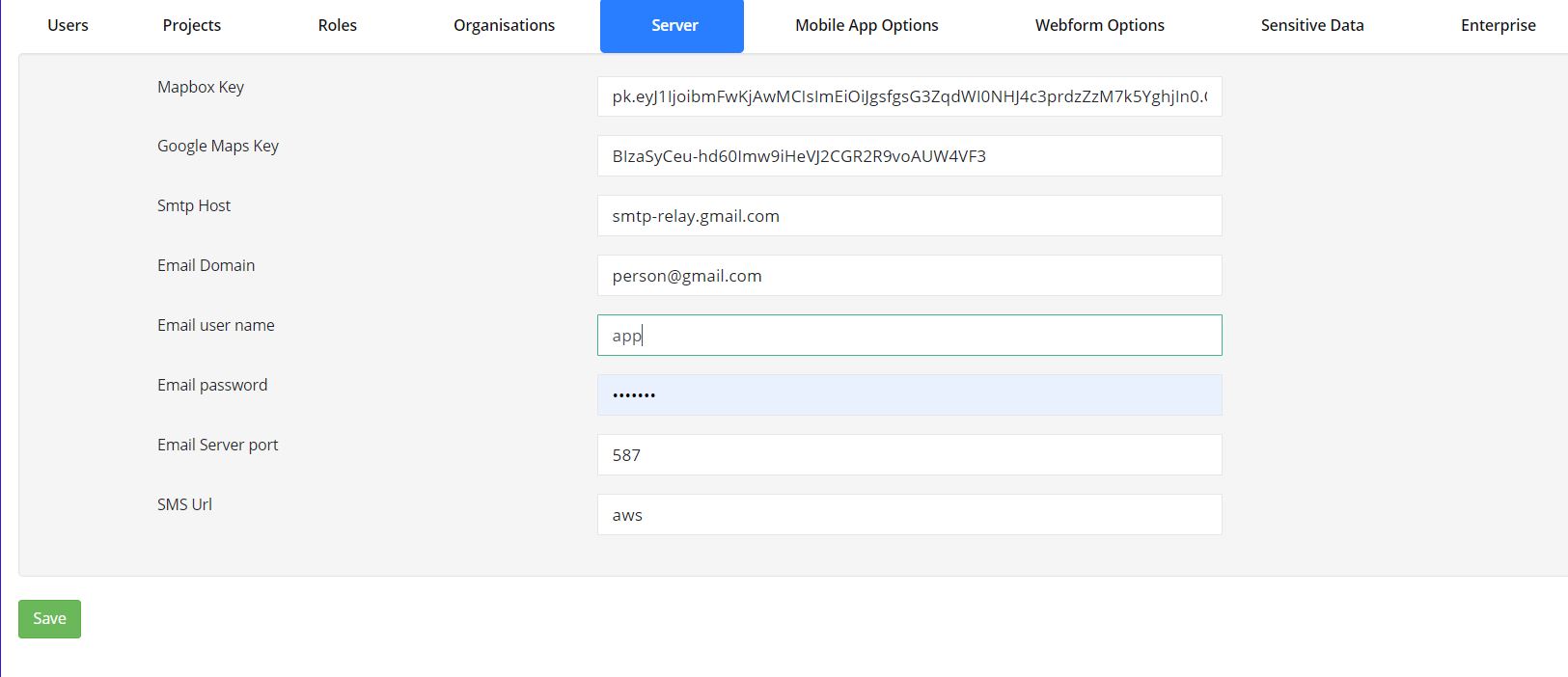
Server Settings
The settings on the server page are defaults that apply to all organisations by default, but they can usually be overridden in an individual organisation's settings.
The server security group
This security group indicates that the user owns the server and can therefore change server-wide settings or monitor server-level events. You cannot set this security group through the user interface. Instead, run SQL directly:
Connect to the
survey_definitionsdatabase.Get the user ID for the user who should have server administration rights:
select id from users where ident = '{user_ident}';
Replace
{user_ident}with the user's ident.Update the
user_grouptable. The numeric identifier of the owner security group is9:insert into user_group (u_id, g_id) values (123, 9);
Replace
123with the user ID from the previous step.
Mapbox Key
This is the key for the Mapbox account used by many of the server maps. Each Mapbox key allows a number of free map requests per month, after which charges apply. (The Mapbox and Google keys in the image above are not real keys.)
Google Map Key
Where Google Maps is used, a Google Maps key is required. As with Mapbox, Google provides a free usage threshold, after which charges apply.
Email Settings
SMTP Host, Email Domain, Email Username, Email Password, and Email Server Port are used when configuring
the email server.
SMS Url
Set this to the URL used to send SMS notifications. The URL should include placeholders for the phone number and message.
${phone}
${msg}
For example:
https://sms.provider.com/send?user=auser&password=apassword&number=${phone}&msg=${msg}
If AWS is used to send SMS messages, enter aws in this field.
SMS messages can be sent from notifications. Once you set the SMS provider URL here, SMS becomes available as a notification
target. In the notification, you can specify the destination number directly or provide a question in submitted data that
contains the number. Define the message text in the notification content section. You can insert submitted data values
using ${question_name}.
Warning
SMS messaging may result in a cost. Therefore it cannot be set up at the organisational level and can only be enabled in the server settings.
API requests per minute
If set to 0, there is no limit. Otherwise, this value sets the maximum number of API requests per organisation, per module, per minute. The API services currently managed by this limit are:
/api/v1/data
/api/v1/data.csv
/api/v2/data
/api/v2/data.csv
/surveyKPI/items
Minimum Password Strength
If set, this specifies the minimum password strength allowed on the server. The enforced strength is the higher of this value and the organisation-level minimum password strength.